

What policies are for
A policy is a reusable template applied to one or more API keys. Rather than configuring limits and access rights on each key individually, you define them once in a policy and issue keys that inherit those rules automatically. When you update the policy, every key bound to it picks up the change. For MCP proxies, policies serve three purposes: Controlling access: a policy determines which MCP proxies a consumer key can reach. Without an entry in the policy’s access rights, the consumer receives403 Forbidden regardless of what key they present.
Governing MCP capabilities: beyond proxy-level access, policies let you restrict which JSON-RPC methods a consumer can use and which specific tools, resources, and prompts they can invoke. This lets you give different consumers different views of the same MCP proxy without creating separate proxy definitions.
Enforcing usage limits: policies apply rate limits and quotas at multiple levels: across the whole policy, per MCP proxy, per JSON-RPC method, and per named primitive. Each consumer key tracks its own independent counters.
What MCP policies control
Access control
Tyk evaluates access control at three levels, in order: Proxy access: the policy’s access rights list determines which MCP proxies the key can reach. A key can only call a proxy listed in its access rights. JSON-RPC method access (json_rpc_methods_access_rights): controls which protocol-level operations the consumer may use. For example, you can allow tools/call and tools/list while blocking sampling/createMessage. Use an allowed list to restrict to specific methods, or a blocked list to exclude specific methods while permitting all others.
Primitive access (mcp_access_rights): controls which specific tools, resources, and prompts the consumer can invoke. Each primitive type (tools, resources, prompts) has its own allowed and blocked list. Values are Go regular expressions, so "internal_.*" matches any tool whose name starts with internal_. A non-empty allowed list acts as an explicit allowlist; blocked entries are excluded from whatever is otherwise permitted.
Rate limiting
Rate limits can be applied at four levels within a policy entry for an MCP proxy: Policy global: the top-levelrate and per fields on the policy apply across all APIs the key accesses.
Per MCP proxy: the limit field inside an access rights entry applies a rate limit specific to calls to that proxy, independent of the consumer’s overall policy rate.
Per JSON-RPC method (json_rpc_methods): sets a rate limit for calls using a specific method name, such as tools/call. The counter applies across all tools invoked via that method.
Per primitive (mcp_primitives): sets a rate limit scoped to a specific named tool, resource, or prompt. A consumer who exhausts their limit on generate_report is blocked from calling that tool while remaining free to call others.
All applicable limits are checked independently on every call. Whichever is exhausted first blocks the request.
Quotas
A quota sets a maximum total number of calls over a renewal period (daily, weekly, or monthly). A consumer who exhausts their quota receives429 Too Many Requests until the period resets. Quotas are configured at the policy level using quota_max and quota_renewal_rate. See Quotas for details.
Configuring MCP policies
Using the Tyk Dashboard
-
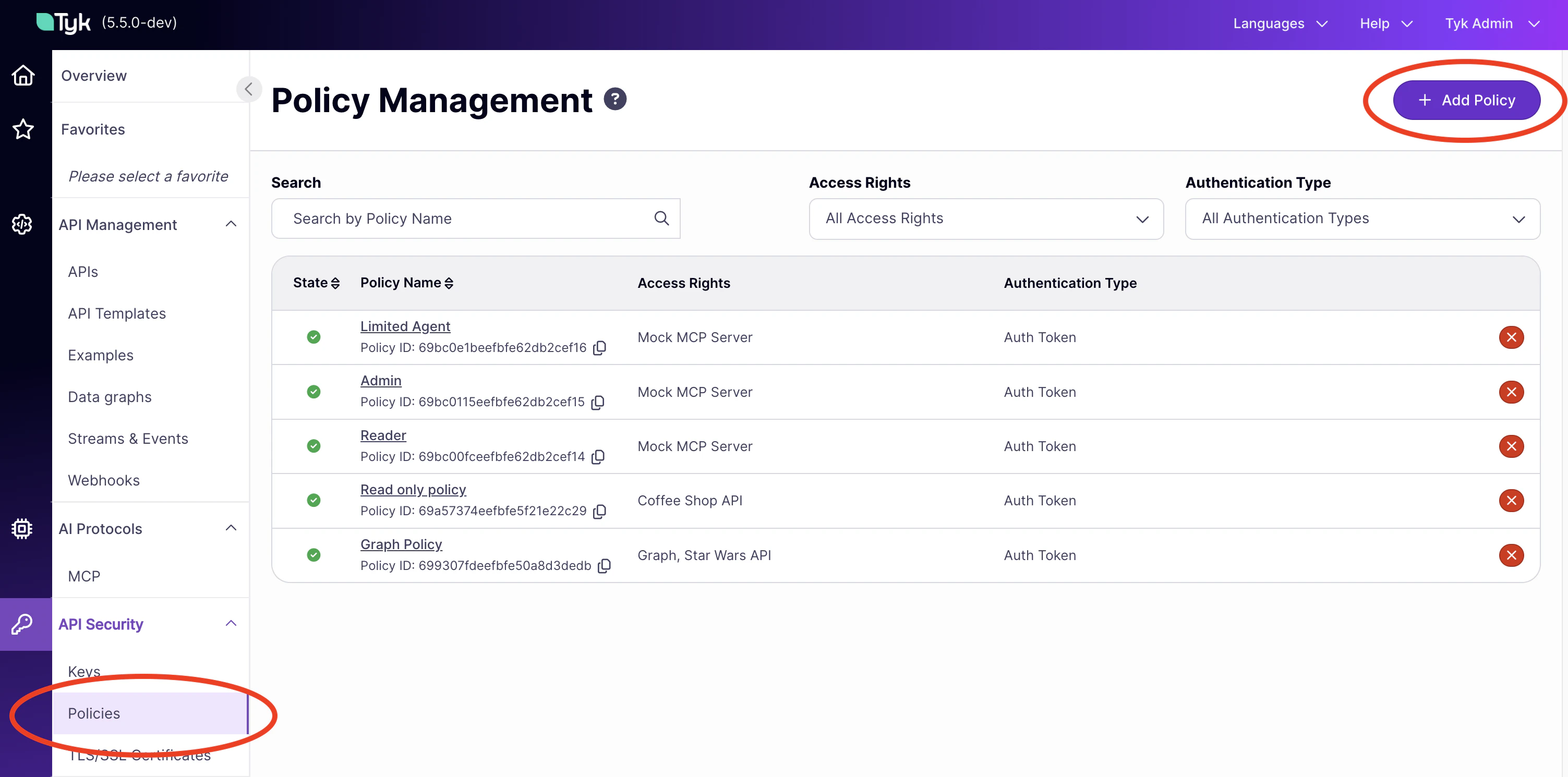
In the Tyk Dashboard sidebar, click Policies then Add Policy.
- On the Access Rights tab, find your MCP proxy in the list and click it to add it to the policy.
- Expand the proxy’s access rights block. You will see sections for primitive rate limits and access control.
- To configure primitive rate limits, click Add Rate Limit. Set the Rate and Per (in seconds) values, then click Add Primitive to associate a named tool, resource, or prompt with that limit. Add multiple primitives to the same group if they share a limit; create separate groups for different limits.
- To configure access control for methods and primitives, use the access control tabs within the access rights block. Add tool, resource, prompt, or method names and toggle them between allowed and blocked.
- On the Configurations tab, set the policy name, key expiry, and global rate limit.
- Click Create Policy.
Using the Dashboard API
Create or update a policy viaPOST /api/portal/policies (create) or PUT /api/portal/policies/{policy-id} (update). The MCP-specific fields sit inside the access_rights entry for each MCP proxy.
The following example creates a policy that grants access to a weather MCP proxy, restricts the consumer to read-only methods, limits them to specific tools, and applies per-primitive rate limits:
Policy schema for MCP
The MCP-specific fields appear inside each entry in theaccess_rights object, alongside the standard limit and versions fields.
Access rights entry
| Field | Type | Description |
|---|---|---|
api_id | string | The ID of the MCP proxy this entry applies to. |
api_name | string | Display name of the proxy. |
versions | array | Always ["Default"] for MCP proxies. |
limit | object | Per-proxy rate limit for this consumer. Contains rate (integer) and per (seconds). |
mcp_access_rights | object | Primitive-level allow/block lists. See below. |
json_rpc_methods_access_rights | object | Method-level allow/block list. Contains allowed (array of strings) and blocked (array of strings). |
mcp_primitives | array | Per-primitive rate limits. Each entry targets one named tool, resource, or prompt. See below. |
json_rpc_methods | array | Per-method rate limits. Each entry targets one JSON-RPC method name. See below. |
mcp_access_rights object
Controls which primitives the consumer can invoke. Each of the three sub-objects follows the same structure.
| Field | Type | Description |
|---|---|---|
tools.allowed | array of strings | Explicit allowlist of tool names. If non-empty, only listed tools are accessible. Supports Go regular expressions. |
tools.blocked | array of strings | Tools to block. Applied after allowed. Supports Go regular expressions. |
resources.allowed | array of strings | Explicit allowlist of resource URIs. |
resources.blocked | array of strings | Resource URIs to block. |
prompts.allowed | array of strings | Explicit allowlist of prompt names. |
prompts.blocked | array of strings | Prompt names to block. |
{}) to apply no restrictions for that primitive type.
mcp_primitives array
Each entry defines a rate limit for one named primitive.
| Field | Type | Required | Description |
|---|---|---|---|
type | string | Yes | Primitive type. Accepted values: tool, resource, prompt. |
name | string | Yes | Name of the primitive as exposed by the MCP server. Case-sensitive. |
limit.rate | integer | Yes | Maximum calls allowed per time window. Set to 0 for unlimited. |
limit.per | integer | Yes | Time window in seconds. Set to 0 for unlimited. |
type and name together. A tool named weather and a resource named weather are independent entries with independent counters.
json_rpc_methods array
Each entry defines a rate limit for one JSON-RPC method.
| Field | Type | Required | Description |
|---|---|---|---|
name | string | Yes | The JSON-RPC method name, for example tools/call or resources/read. |
limit.rate | integer | Yes | Maximum calls using this method per time window. |
limit.per | integer | Yes | Time window in seconds. |
Top-level policy fields
| Field | Type | Description |
|---|---|---|
rate | integer | Global rate limit across all APIs in the policy. |
per | integer | Time window for the global rate limit, in seconds. |
quota_max | integer | Maximum total calls in the quota period. Set to -1 for unlimited. |
quota_renewal_rate | integer | Quota renewal period in seconds. Common values: 86400 (daily), 604800 (weekly). |
key_expires_in | integer | Key lifetime in seconds from creation. Set to 0 for no expiry. |
When multiple policies apply
A consumer key can have multiple policies applied to it. Tyk merges MCP-specific fields as follows:- Rate limits: the most permissive limit wins. If two policies define a limit for the same primitive, the higher
ratevalue is used. mcp_access_rightsandjson_rpc_methods_access_rights:allowedlists are merged by union (the consumer gains access to the combined set).blockedlists are also unioned, so a primitive blocked in any policy remains blocked.- Proxy access: the consumer gains access to the union of all proxies listed across all their policies.
Applying a policy to a consumer
A policy takes effect when it is applied to an access key. In the Tyk Dashboard, go to Keys, click Add Key, select the policy from the Apply Policy dropdown, and generate the key. Issue the key to the consumer; they include it in theAuthorization header of every MCP request.
See Policies for full details.