

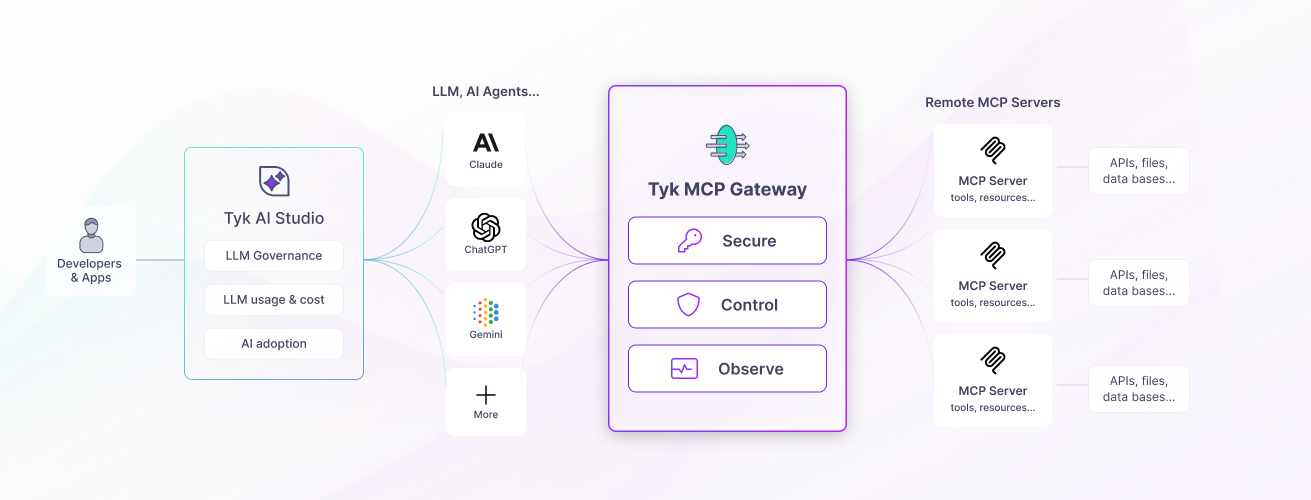
What is MCP?
MCP uses a client-server model: an MCP client (an AI agent or framework) connects to an MCP server that exposes tools, resources, and prompts through JSON-RPC 2.0 messages over HTTP. For the full protocol reference, see MCP Gateway: Core Concepts or the MCP specification.The problem with ungoverned MCP
Remote MCP servers are HTTP services. Like any HTTP service, they need authentication, rate limiting, access control, and observability to be operated reliably at scale. Without a gateway layer, each individual server must address these concerns on its own (if at all), leading to: Inconsistent security. Each MCP server implements its own authentication, or none at all. No central place exists to enforce who can access which tools, rotate credentials, or revoke access. No visibility. No standard way exists to see which AI agents are calling which tools, how often, and whether calls are succeeding. Troubleshooting failures or planning capacity requires digging into individual server logs. Ungoverned proliferation. MCP servers can appear across teams without oversight. No registry exists of what is available, no approval process, and no way to apply organization-wide policies consistently. Fragile direct connections. AI agents connecting directly to MCP servers have no protection if a server is slow or unavailable. Rate limits, circuit breakers, and timeouts must be rebuilt on every server independently.Where Tyk fits
Tyk Gateway sits in front of your remote MCP servers and proxies all MCP traffic through a centrally managed gateway layer. AI clients connect to Tyk at a configured listen path; Tyk authenticates the request, applies the configured middleware chain, and forwards the request to the upstream MCP server. The Tyk Dashboard serves as the registry layer, the central catalog of every MCP server in your organization, with the access policies and observability that govern how each one is used.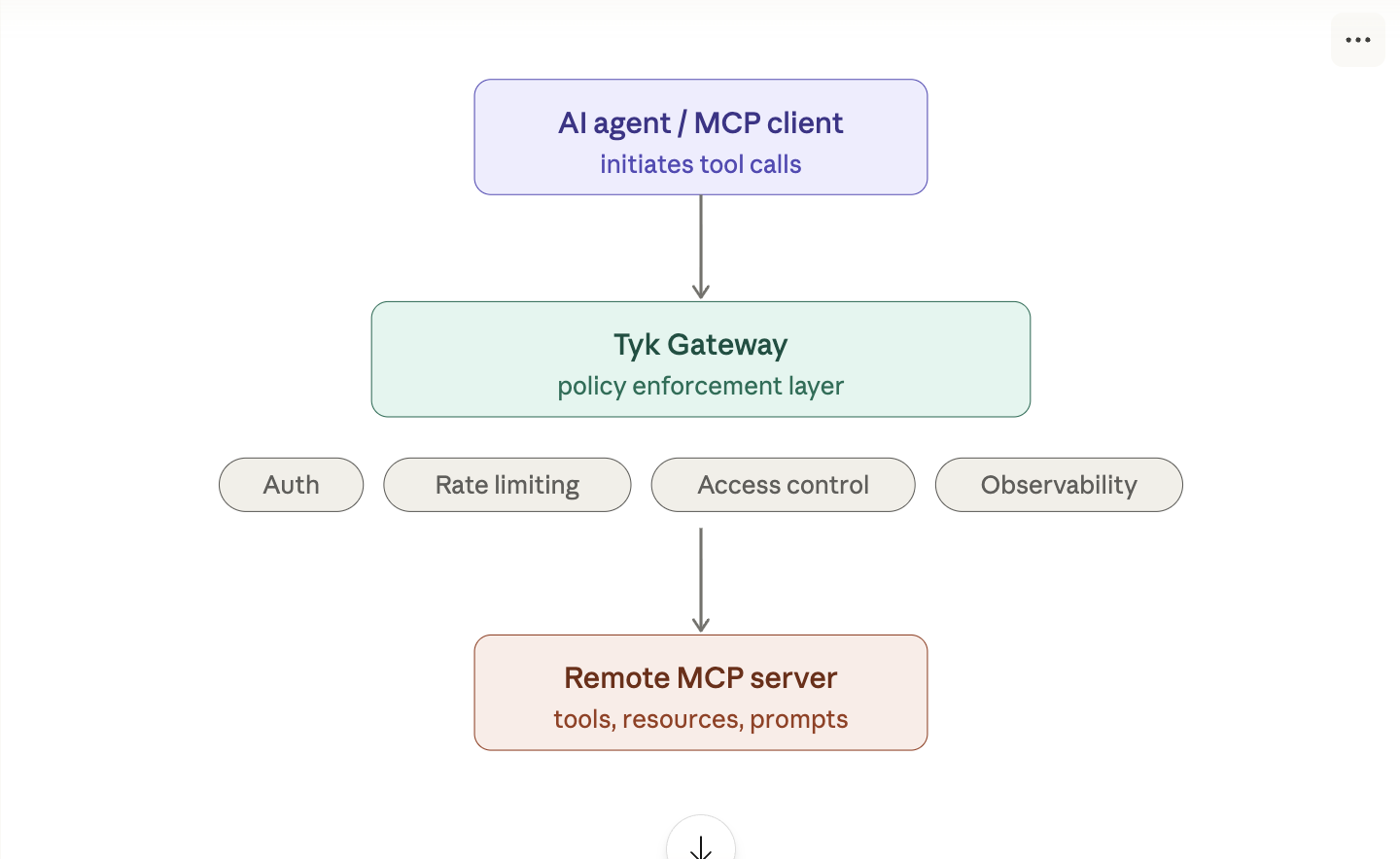
POST /mcp: JSON-RPC messages from client to server. Tyk applies the middleware chain and proxies the request, streaming SSE responses through if the upstream returns them.GET /mcp: Long-lived SSE connections for server-initiated messages. Tyk maintains the connection and passes events through transparently.
How Tyk represents MCP proxies
Tyk models each remote MCP server as a Tyk OAS API definition, an OpenAPI 3.0 document extended with thex-tyk-api-gateway vendor extension. This is the same format used for REST APIs, so MCP proxies share the same configuration model, tooling, and management APIs as the rest of your Tyk estate.
The MCP proxy definition configures:
- The listen path: the URL prefix where Tyk exposes the MCP proxy to clients
- The upstream URL: the address of your remote MCP server
- Authentication: which method to use and how to validate credentials
- Middleware: per-primitive access control, rate limits, caching, transformations, and more
MCP proxy definitions require Tyk OAS format. Tyk Classic API definitions do not support MCP.
What Tyk MCP Gateway provides
Authentication and key management
Tyk authenticates every MCP request before it reaches your upstream server. All authentication methods supported for REST APIs work identically for MCP: bearer tokens, API keys, JWT, OAuth 2.0, and mTLS. You issue and manage API keys through the Tyk Dashboard or API, and every key is associated with a security policy that defines what it can access and at what rate. This means your MCP servers don’t need to implement their own authentication. Tyk handles credential verification, token validation, and key lifecycle centrally: rotation, expiration, and revocation. The MCP specification mandates OAuth 2.1 as the authorization framework and requires MCP servers to implement Protected Resource Metadata (PRM), a discovery document that tells OAuth-aware clients which authorization server to use and which scopes the resource supports. Tyk implements PRM natively: it serves the/.well-known/oauth-protected-resource endpoint automatically and returns the correct WWW-Authenticate challenge on unauthenticated requests, so compliant MCP clients can self-configure without any pre-configuration. See OAuth 2.1 authentication for the full implementation details.
Access control and policy enforcement
Security policies give you granular, per-consumer control over what MCP consumers can see and access, and how often. Rather than configuring each key individually, you define a policy once and issue keys that inherit its rules automatically. For MCP proxies, policies go significantly further than the rate limits and quotas available for standard REST APIs. A policy can control which proxies a consumer key can reach, which JSON-RPC methods it is permitted to use, which individual tools, resources, and prompts it can invoke or discover, and what rate limits and quotas apply at each level, independently for each consumer. This is what makes it practical to serve many different AI agents from a single MCP proxy. A read-only analyst agent and a privileged administrator agent can share the same upstream server but operate within completely different entitlements, each enforced at the gateway without any changes to the upstream. Tyk also filters discovery responses per consumer. When an agent callstools/list, resources/list, or prompts/list, Tyk intercepts the upstream response and returns only the primitives that consumer is permitted to see. Each agent’s view of the server’s capabilities is scoped to its own entitlements from the moment it connects.
Service registry
The Tyk Dashboard’s MCP section serves as a central registry of all MCP servers in your organization. Each MCP proxy is a registry entry that records the upstream server’s address, its listen path, the tools and resources it exposes, and the access policies that govern it. This gives teams a single authoritative source of truth for what MCP capabilities are available, who can access them, and under what conditions. When a new MCP server is onboarded, registering it as a proxy in the Dashboard makes it discoverable to authorized agents and invisible to everyone else, without changes to the upstream server or the agents themselves. See Managing MCP proxies.Traffic management
Tyk applies the same traffic management capabilities to MCP traffic that it provides for REST and GraphQL:- Rate limiting at every level of granularity: across all consumers on a proxy, per consumer key, per JSON-RPC method, and down to the individual named tool, resource, or prompt. Limits at each level are tracked independently, so a consumer exhausting their budget on one tool does not affect their access to others.
- Throttling to queue requests that exceed the rate limit rather than rejecting them immediately.
- Timeouts per primitive, so a slow tool response does not stall the entire MCP session.
- Circuit breakers that detect failure patterns on individual tools and temporarily stop forwarding requests, giving the upstream time to recover.
- Request size limits to protect against oversized argument payloads on tools that accept large inputs.
- Upstream rate limits that protect your MCP server from being overwhelmed regardless of how many consumers are configured.
Analytics
Tyk records analytics for every MCP request and exposes them in the Tyk Dashboard under Monitoring → Activity by MCP. Analytics are captured at two levels. Proxy-level charts show total request volume, error counts, and HTTP error code distribution across all your MCP proxies. Use these to compare traffic and error rates between proxies and identify trends over time. Primitive-level charts break the data down by individual tool, resource, or prompt: call volumes over time, most frequently called primitives, highest error rates, and slowest average latency. These charts show exactly which tools AI agents are calling, which are failing, and which are your performance bottlenecks, without any additional instrumentation. Both levels of data appear alongside your REST and GraphQL API analytics, giving you a unified view of your entire API estate. See MCP observability.Observability
Beyond the Dashboard analytics page, Tyk emits MCP-specific observability signals that integrate with your existing monitoring infrastructure. Structured access logs include four MCP-specific fields on every logged request: the JSON-RPC method invoked (mcp_method), the primitive type (mcp_primitive_type), the primitive name (mcp_primitive_name), and a gateway-mapped error code when the request fails at the gateway layer (mcp_error_code). These fields let you filter and aggregate MCP traffic in your log management tooling using the same pipeline you use for REST APIs. See MCP access logs.
OpenTelemetry metrics: when OTel is enabled on the gateway, Tyk emits four MCP-specific metric instruments covering request counts (with dimensions for method, primitive type, tool name, and error code), method distribution, upstream latency per tool, and end-to-end request latency. These metrics can be scraped by Prometheus and used to build dashboards in Grafana or your preferred metrics platform. See MCP metrics and How to build a Grafana dashboard for MCP traffic.
Requirements and limitations
Requirements
| Requirement | Detail |
|---|---|
| Tyk Gateway version | v5.13 or later |
| API definition format | Tyk OAS only. Tyk Classic API definitions do not support MCP. |
| API definition extension | The x-tyk-api-gateway vendor extension is required in every MCP proxy definition. |
Supported transports
Tyk MCP Gateway supports the Streamable HTTP transport defined in the MCP2025-11-25 specification:
POST /mcp: JSON-RPC messages from client to server, with optional SSE streaming responses.GET /mcp: Long-lived SSE connection for server-initiated messages.
HTTP-to-MCP translation
When using Tyk to convert an existing REST API into MCP tools (via AI Studio), only OpenAPI REST APIs are supported as the source. GraphQL APIs cannot be converted to MCP tools.MCP specification version
Tyk supports the MCP2025-11-25 specification. For the full protocol reference, see the MCP specification.