Before forwarding a matched request, Tyk Gateway can rewrite the request path. This handles two common situations: where the path a client uses differs from the path the upstream service expects, and where the destination should be determined by the content of the request rather than the incoming URL.
Path modification is applied by the URL rewrite middleware, which is configured at the endpoint level in the API definition.
How It Works
The URL rewrite middleware uses triggers to determine when and how to rewrite the request path. Each trigger combines one or more matching conditions with a rewrite target.
The Basic Trigger
The basic trigger tests the request path against a regular expression. It serves as a control switch for the middleware: if the path does not match, no rewriting takes place, regardless of any advanced triggers configured.
When the regex includes capturing groups - subexpressions wrapped in parentheses - each matched group is assigned an index: $1 for the first, $2 for the second, and so on. These captured values can appear anywhere in the rewrite target.
For example, the pattern /(\\w+)/(\\w+) applied to /fiction/9780 captures fiction as $1 and 9780 as $2. A rewrite target of category/$1?id=$2 would resolve to category/fiction?id=9780.
When testing the request path, Tyk handles percent-encoded characters in two passes. If the pattern does not match the raw URL, Tyk decodes percent-encoded characters (for example, %2D to -) and tries again. Only the raw and fully decoded forms are checked.
Advanced Triggers
Advanced triggers are optional and are only evaluated after the basic trigger fires. Each advanced trigger tests one or more elements of the request against a regular expression. The testable elements are:
| Element | Description |
|---|
| Query parameter | A named URL query string value |
| Request header | An HTTP request header; use the normalized form, for example X-Preview not x-preview |
| Path parameter | An individual segment of the request path, matched by splitting the path on / |
| Request body | The full request body; no element name required |
| Session metadata | A named field in the metadata attached to the current session |
| Request context | A named context variable such as client IP address or JWT claim |
any (at least one must match) or all (every element must match). Any individual test can be negated, so the condition passes when the element does not match the pattern.
Advanced triggers are evaluated in the order they are defined. The first to fire is applied and the rest are skipped. If none fire, the basic trigger’s rewrite target is used.
When an advanced trigger fires, the value of each request element that was tested is stored and made available in the rewrite target.
The Rewrite Target
Each trigger specifies a rewrite target: a static path or a dynamically constructed string. The following sources of dynamic values are available:
Captured path segments from the basic trigger - the $1, $2, … groups extracted by the basic trigger regex. These are available in any trigger’s rewrite target, not just the basic trigger’s own. This is how path segment values are made available when an advanced trigger fires.
Request element values from advanced triggers - when an advanced trigger fires, each element value it tested is available as $tyk_context.trigger-{n}-{name}-{i}, where:
n is the trigger’s position in the list, zero-based.name is the element name (for example, region for a query parameter named region).i is the index within the element, used when an element can return multiple values (such as a repeated header).
For example, in the configuration shown in the Worked Example below, advanced trigger 1 (the first in the list, so n=0) tests the region query parameter. When it fires on a request with ?region=us, the value us is available as:
$tyk_context.trigger-0-region-0
↑ ↑ ↑
n name i
i index is 0 because region has a single value. For elements that can carry multiple values - for example a header sent twice in the same request - successive values are indexed from 0: $tyk_context.trigger-0-X-Tag-0, $tyk_context.trigger-0-X-Tag-1, and so on.
If the pattern for an advanced trigger rule contains capturing groups, those captured substrings are also stored and are accessible with an additional index j appended: $tyk_context.trigger-{n}-{name}-{i}-{j}, where j is zero-based and corresponds to the first, second, and so on capturing group in the pattern. For example, a pattern (\\w+)-(\\w+) applied to a header value eu-west would store eu as $tyk_context.trigger-0-X-Region-0-0 and west as $tyk_context.trigger-0-X-Region-0-1.
Session metadata - using the $tyk_meta. namespace.
Key-value storage - using the appropriate KV reference notation.
Consul and Vault KV references must appear at the end of the rewrite target. Tyk’s token-matching pattern treats / as a valid key character, so a reference placed mid-path - for example upstream/$secret_consul.myKey/suffix - will match $secret_consul.myKey/suffix as the token and attempt to look up the key myKey/suffix rather than myKey. This limitation does not apply to environment variables or Gateway secrets.
tyk:// internal address to route the request to another API on the same Tyk Gateway instance. See Internal Routing.
Matching Behaviour
The URL rewrite middleware applies its own regular expression matching to the request path. It does not use the endpoint matching mode (wildcard, prefix, suffix, or exact) configured at the Gateway level, and is not affected by changes to those settings. See Request Matching for details on endpoint matching modes.
Configuration
Tyk OAS
The middleware is configured in the operations section of the Tyk Vendor Extension (x-tyk-api-gateway), under the operationId for the endpoint.
Basic Trigger
Enable the middleware and set pattern and rewriteTo:
"urlRewrite": {
"enabled": true,
"pattern": "/(\\w+)/(\\w+)",
"rewriteTo": "books-service/$1/$2"
}
GET /fiction/9780 matches the pattern, capturing fiction as $1 and 9780 as $2. The path is rewritten to books-service/fiction/9780.
Advanced Triggers
Add a triggers array to the urlRewrite object. Each entry specifies condition (any or all), rules, and rewriteTo. Rules use the following fields:
| Field | Description |
|---|
in | Key location: path, query, header, sessionMetadata, requestBody, requestContext |
name | Key name (not required when in is requestBody) |
pattern | Regular expression to test against the key value |
negate | true to pass the rule when the pattern does not match |
"urlRewrite": {
"enabled": true,
"pattern": "/(\\w+)/(\\w+)",
"rewriteTo": "books-service/$1/$2",
"triggers": [
{
"condition": "all",
"rewriteTo": "regional-books-service/$tyk_context.trigger-0-region-0/$1/$2",
"rules": [
{ "in": "query", "name": "region", "pattern": "\\w+", "negate": false },
{ "in": "header", "name": "X-Preview", "pattern": "true", "negate": true }
]
},
{
"condition": "any",
"rewriteTo": "preview-books-service/$1/$2",
"rules": [
{ "in": "header", "name": "X-Preview", "pattern": "true", "negate": false }
]
}
]
}
region query parameter is present AND X-Preview is not true. The second fires when X-Preview is true. If neither fires, the basic trigger routes to books-service.
API Designer
-
Add an endpoint - From the API Designer, add an endpoint for the path and method to modify.
-
Select the URL Rewrite middleware - Select ADD MIDDLEWARE and choose URL Rewrite.
-
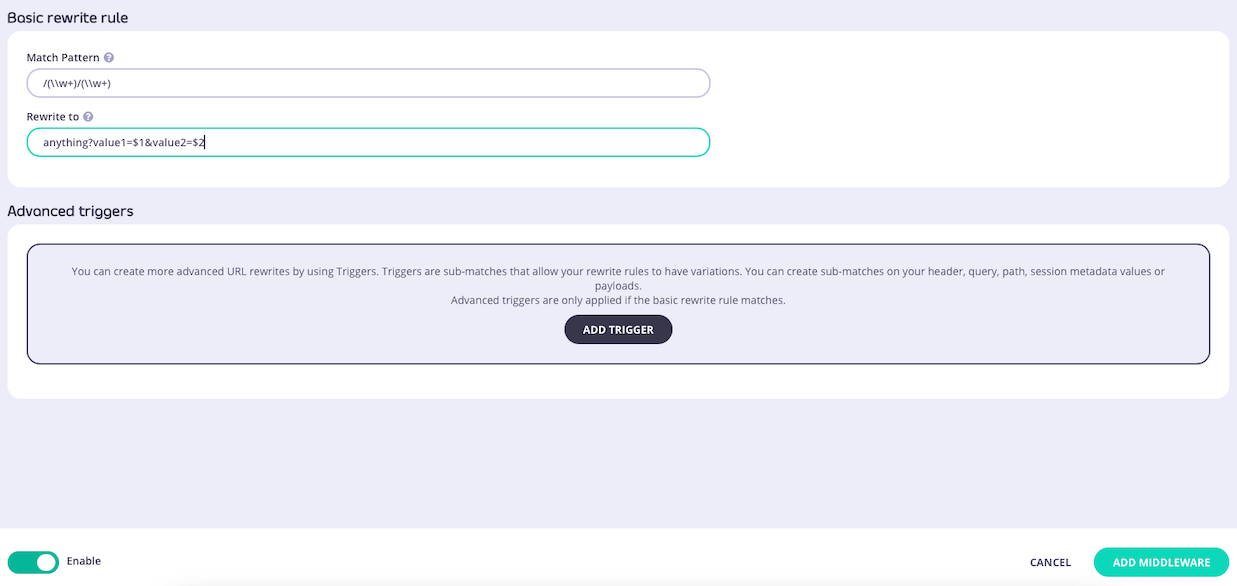
Configure the basic trigger - Enter the match pattern and the rewrite target.
-
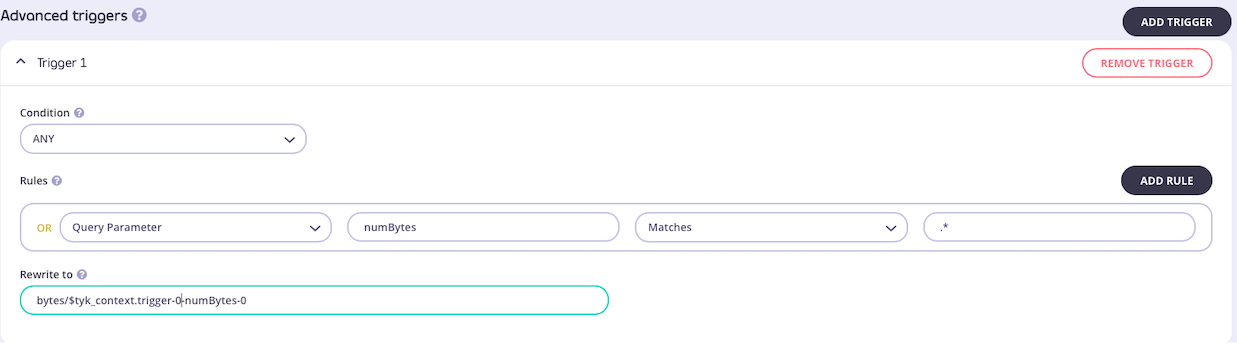
Optionally configure advanced triggers - Select ADD TRIGGER for each additional trigger. Use ADD RULE to add rules to each trigger.
-
Save the API - Select ADD MIDDLEWARE, then SAVE API.
Tyk Classic
If using Tyk Classic, add a url_rewrites object to the extended_paths section of the API definition. To reference context variables in rewrite_to, enable context variables for the API.
Basic Trigger
"url_rewrites": [
{
"path": "/{category}/{id}",
"method": "GET",
"match_pattern": "/(\\w+)/(\\w+)",
"rewrite_to": "books-service/$1/$2"
}
]
Advanced Triggers
Add a triggers array to the url_rewrites entry. Each trigger specifies on (any or all), options (the rules, nested by key location), and rewrite_to. The key location fields are:
| Field | Location |
|---|
header_matches | Request header |
query_val_matches | Query parameter |
path_part_matches | Path parameter |
session_meta_matches | Session metadata |
payload_matches | Request body |
request_context_matches | Request context variable |
match_rx (the pattern) and reverse (true to pass when the pattern does not match).
"triggers": [
{
"on": "all",
"options": {
"query_val_matches": {
"region": { "match_rx": "\\w+", "reverse": false }
},
"header_matches": {
"X-Preview": { "match_rx": "true", "reverse": true }
}
},
"rewrite_to": "regional-books-service/$tyk_context.trigger-0-region-0/$1/$2"
},
{
"on": "any",
"options": {
"header_matches": {
"X-Preview": { "match_rx": "true", "reverse": false }
}
},
"rewrite_to": "preview-books-service/$1/$2"
}
]
region query parameter is present AND X-Preview is not true. The second fires when X-Preview is true.
API Designer
-
Add an endpoint - From the Endpoint Designer, add an endpoint and select the URL Rewrite plugin.
-
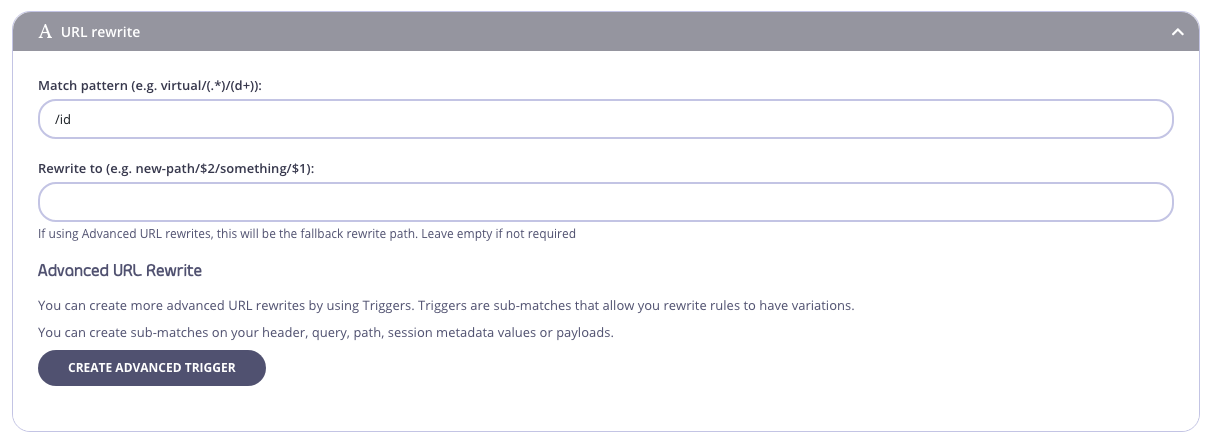
Configure the basic trigger - Add the match pattern and the rewrite target.
-
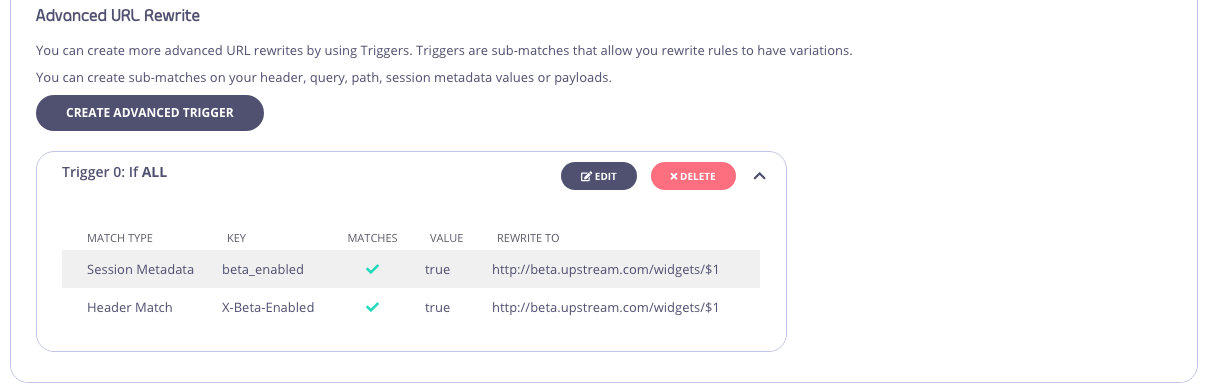
Optionally configure advanced triggers - Select Create Advanced Trigger. Triggers can be edited or removed in the Advanced URL Rewrite section.
-
Save the API - Select Save or Create.
Tyk Operator
Tyk Operator supports both Tyk OAS and Tyk Classic API definitions. The URL rewrite middleware is configured in the same way as described above for each format - in the operations section of the Tyk Vendor Extension for Tyk OAS, or in extended_paths.url_rewrites for Tyk Classic.
See Tyk Operator for details on creating and managing API definitions with Tyk Operator.
Worked Example
This example shows basic and advanced triggers working together on an endpoint GET /{category}/{id} that routes book catalog requests to different upstream services depending on the region and whether the request is a preview.
Configuration:
- Basic trigger - pattern
/(\\w+)/(\\w+) matches the path, capturing the category as $1 and the book ID as $2. Rewrite target: books-service/$1/$2.
- Advanced trigger 1 (
all) - fires when the region query parameter is present AND the X-Preview header is not true (negated). Rewrite target: regional-books-service/$tyk_context.trigger-0-region-0/$1/$2.
- Advanced trigger 2 (
any) - fires when the X-Preview header is true. Rewrite target: preview-books-service/$1/$2.
Outcomes:
| Request | Path rewritten to |
|---|
GET /fiction/9780?region=us | regional-books-service/us/fiction/9780 |
GET /fiction/9780 with X-Preview: true | preview-books-service/fiction/9780 |
GET /fiction/9780 | books-service/fiction/9780 |
region=us satisfies condition 1, and X-Preview is absent so the negated condition 2 passes. The rewrite target combines the captured region ($tyk_context.trigger-0-region-0) with $1 and $2 from the basic trigger.
For the second request, the region parameter is absent so trigger 1 does not fire. Trigger 2 fires on the X-Preview header.
For the third request, neither advanced trigger fires and the basic trigger’s target is used.
Tyk OAS configuration:
"urlRewrite": {
"enabled": true,
"pattern": "/(\\w+)/(\\w+)",
"rewriteTo": "books-service/$1/$2",
"triggers": [
{
"condition": "all",
"rewriteTo": "regional-books-service/$tyk_context.trigger-0-region-0/$1/$2",
"rules": [
{ "in": "query", "name": "region", "pattern": "\\w+", "negate": false },
{ "in": "header", "name": "X-Preview", "pattern": "true", "negate": true }
]
},
{
"condition": "any",
"rewriteTo": "preview-books-service/$1/$2",
"rules": [
{ "in": "header", "name": "X-Preview", "pattern": "true", "negate": false }
]
}
]
}

